
The Ultimate Python Cheatsheet for Data Cleaning
Data cleaning is the most crucial yet time-consuming step in any data project. A well-cleaned dataset ensures better insights and more…

Data cleaning is the most crucial yet time-consuming step in any data project. A well-cleaned dataset ensures better insights and more accurate models. To save time and effort, I’ve compiled this ultimate cheatsheet with the most essential Python commands for data cleaning using pandas.
If you’re working with messy data, this guide will help you streamline the process and make your dataset analysis-ready. Let’s dive in! 🚀
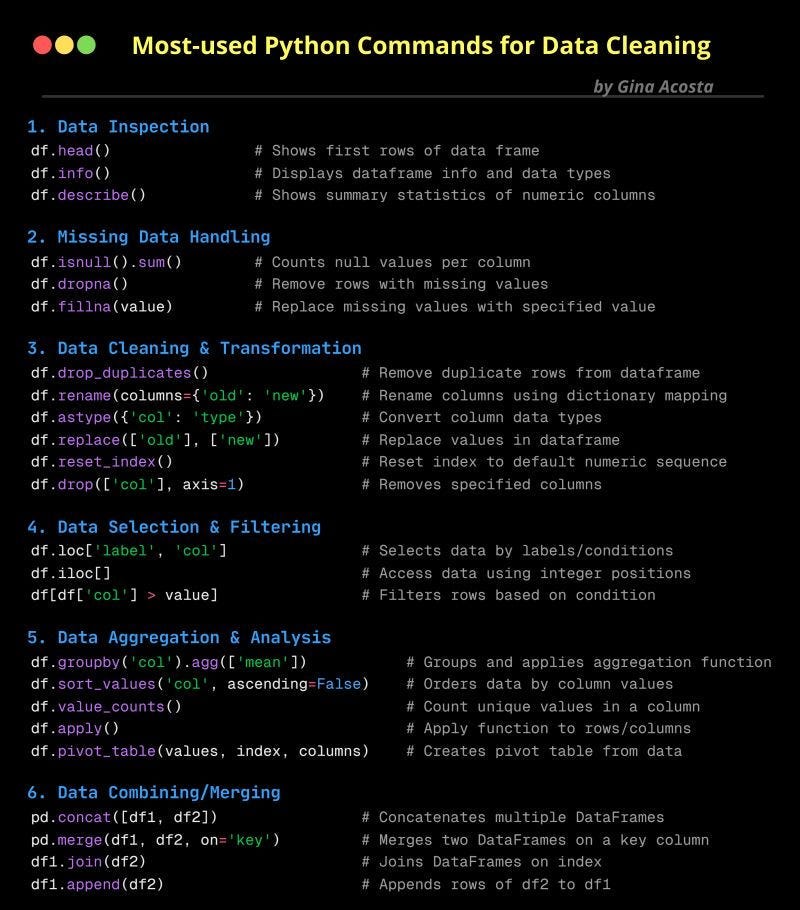
1. Data Inspection 🕵️♂️
Before cleaning, you need to understand your data. These commands help you take a quick look:
import pandas as pd

# Sample DataFrame
data = {'Name': ['Alice', 'Bob', 'Charlie', None], 'Age': [25, None, 30, 22], 'Salary': [50000, 60000, None, 45000]}
df = pd.DataFrame(data)

# Display first few rows
df.head()

# Get info on columns and data types
df.info()

# Get summary statistics for numerical columns
df.describe()
2. Fixing Missing Data 🔍
Missing data can lead to inaccurate analysis. Here’s how to find and fix it:
# Check for missing values
df.isnull().sum()

# Drop rows with missing values
df.dropna()


# Fill missing values with a specific value
df.fillna({'Age': df['Age'].mean(), 'Salary': df['Salary'].median()})
3. Cleaning & Transforming Data 🛠️
Cleaning data ensures consistency and correctness. Here are the must-know commands:
# Remove duplicate rows
df.drop_duplicates()

# Rename columns
df.rename(columns={'Name': 'Full Name'})

# Convert column data types
df.astype({'Age': 'int'})

# Replace specific values
df.replace({'Alice': 'Alicia'})

# Reset index
df.reset_index(drop=True)

# Drop a specific column
df.drop(['Salary'], axis=1)
4. Selecting & Filtering Data 🎯
Once cleaned, you may want to filter or extract specific data:
# Select rows using labels
df.loc[0, 'Name']

# Select rows using index positions
df.iloc[1]

# Filter rows based on a condition
df[df['Age'] > 25]
5. Aggregation & Analysis 📊
Summarizing and analyzing data is key to extracting insights:
# Group by column and get the mean
df.groupby('Age').agg(['mean'])

# Sort values in descending order
df.sort_values('Salary', ascending=False)

# Count unique values
df['Age'].value_counts()
6. Combining & Merging Data 📎
Often, you need to merge multiple datasets. Here’s how:
# Create another sample DataFrame
df2 = pd.DataFrame({'Name': ['Alice', 'Bob', 'Charlie'], 'Department': ['HR', 'IT', 'Finance']})

# Concatenate DataFrames vertically
pd.concat([df, df2])
# Merge DataFrames on a common column
pd.merge(df, df2, on='Name', how='inner')
# Join DataFrames
df.join(df2.set_index('Name'), on='Name')
Data cleaning doesn’t have to be overwhelming. With these essential Python commands, you’ll speed up your workflow and ensure your data is analysis-ready. Whether you’re dealing with missing values, duplicates, or merging datasets, these functions have you covered!
Start using these techniques today and elevate your data projects! 🚀